Friday, September 30, 2011

Using Social Media To Build B2B Relationships

In a recent interview, Tom Skotidas was spot on with his assessment of an important difference between the Business-To-Consumer (B2C) and Business-To-Business (B2B) markets.

Do you want to use LinkedIn, Twitter or Facebook to help develop B2B opportunities? Then, as Tom says, you must aim towards eventually creating real world business relationships.

You can do this by first establishing visibility through a regular stream of activity associated with your on-line presence. And then by looking for opportunities to engineer face-to-face meetings.

Once you have the required visibility, you'll be in a position to suggest the following to your on-line contacts:

  • Attending a meeting of your favourite business group
  • Joining a get-together you're organising at an industry conference
  • Coming along to a business social event
  • Or, maybe even having a one-on-one meeting

But these tactics will only be effective AFTER you have established a reasonable degree of visibility on-line.

You can see the full Sky Business News interview with Tom Skotidas right here:


Wednesday, September 28, 2011

Firefox Version 7 Released

This latest release of the Firefox Internet browser promises to provide better utilisation of your PC memory. 

Which has to be a good thing.

Still using Internet Explorer? You really should give Firefox a try. Heaps of useful features and a wide range of add-on functions. And it's free.

Find more information on Firefox at: http://www.mozilla.org/en-US/firefox/features/ .

You can download Firefox version 7 from:  http://firefox7.org/

Thursday, September 22, 2011

Pricing Rip-Off's For Software

Australian's are being significantly overcharged for software according to an article in today's Sydney Morning Herald. That's even more true for businesses that don't take advantage of the great range of FREE software and services that are now available.

But how do you find free products that are effective, reliable and well-supported? 

Follow this blog for a start. It will provide regular information on the latest free offerings.


 Want to start using the best free products straight away? Then get our sister publication - Free Business Resources. It will provide you with a catelouge of over 130 carefully reviewed free products that are suitable for business use.

Free Business Resources can save your business thousands of dollars. And offer you a host of ways to improve efficiency.


Need To Collect Information?

Create neat, customised forms for your business using Zoho Creator.

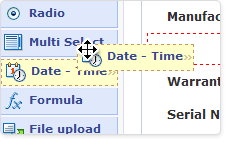
Zoho Creator allows you to create an online form by inserting fields using simple drag-and-drop actions. Pre-configured forms are also available. It provides a range of views enabling you to examine the information collected. You can even generate graphical reports.

According to Zoho, the facility is completely non-programmer friendly and allows you to have a customised form available online within minutes. Although more complex, database-style functionality can be added if required.

The free version of Zoho Creator enables you to create three different forms and collect up to 1000 records. Low cost subscription plans are available from $15 per month, if you require greater capacity, more report types or the payment module option.

The video below will give you a snapshot of how Zoho Creator works.


Tuesday, September 6, 2011

Is Software About To Destroy Your Business?

Is your business about to be decimated by a software application? Is it time to stop worrying about low-cost overseas competition and start preparing for the arrival of software which supersedes your business altogether?

If even part of your business operations involve the supply and/or processing of information, the answer to both of the above questions may well be yes. 

By Patrick Horsley @ flickr
Software eats part of the world, a recent article by John Hempton of Bronte Capital, provides numerous examples of how companies producing physical products are being "appified". By which he means, their business models are being dramatically undermined by newly emerging software applications. This process may be even more disruptive to professional service companies, whose competitive advantages often revolve around their handling of information.

There are already many examples of "software" businesses that have have changed whole industries. Just think of Amazon, Google, Netflix and Apple's iTunes. 

The time has now arrived when many more businesses are under the threat of having, at least, a part of their operations "appified". Three reasons why this impending treat must now be taken seriously by an ever increasing range of businesses are provided in an Essay by Marc Andreessen in the Wall Street Journal. The reasons are:

 By thomcochrane @ flickr
  • Over two billion people already use broadband Internet.
  • Within the decade over five billion people will own smartphones with Internet access.
  • The cost of placing an application on the Internet and making it easily available to a worldwide market has now dropped to just $1,500 per month.

So how do you ensure your business continues to thrive? 
  • Watch out for the emergence of software applications which could impact your business model. And don't underestimate which areas of your business may be effected.
  • Embrace software which can make your business more effective. (You'll find some of my suggestions covered in this blog from time to time.)
  • Focus your business on activities that are hard to replicate with software. These will include, in particular, activities based around personal relationships, collaboration, partnerships, combining skills and creativity.

What other ways are there to evolve a business in order to compete with the inevitable "digitisation" of traditional business processes? Your thoughts will be welcome.

Wednesday, August 31, 2011

Find Out Who You're Dealing With - Automatically

This neat little application allows Gmail users to instantly find information about people with whom you're exchanging emails. And display that information right alongside the email itself.


Rapportive extracts information from LinkedIn, Facebook, Twitter and a number of other sources. An overview of this information is then displayed in a panel on the right hand side of your email in-box.You can even request a "connection" with your correspondent right there and then.

If there is more than one email address in a message, simply float your mouse pointer over any alternative address to get information on that person.

Twitter fanatic? You can follow, reply, and retweet all without leaving Gmail!

There are also a number of extensions available - called Raplets -  these allow your Rapportive side bar to pull in information from a number of 3rd Party applications including MailChimp, BatchBook and CruchBase.


As from July, you can even use Rapportive when you are composing an email. This allows you to enhance relationships with your correspondents by mentioning items from their latest posts on Twitter and Facebook.


Write Better Emails With Rapportive


For busy Gmail users, this product is a must have. Download Rapportive at http://rapportive.com/install


Easy, Secure Access To All Those Pesky Passwords

KeyPass is secure password storage software with a range of easy-to-use features.

The software and passwords reside on your own PC and are secured by advanced encryption. A master password provides access to the password details. But don't ever forget the master password because even KeyPass themselves can retrieve it for you!

This product makes it really easy to manage the wide range of passwords we all need today to secure information and resources. There is even random password generator if you can't be bothered to make up your own passwords.

Passwords can be organised into groups to make them easy to locate. You can even cut and paste passwords from the KeyPass display, saving you the hassle of re-typing (or mistyping) them when they're needed.

You can download KeyPass from http://keepass.info/download.html


Saturday, July 23, 2011

How safe is your password?


A very pertinent article on passwords is published in today's edition of the UK's Independent newspaper. Some fascinating details and very sage advice.

Monday, June 20, 2011

If You Use Lists......You'll Love Remember The Milk

Making up lists of activities is an almost essential part of running your business and personal affairs. 

But what do you do with these lists and how do you keep them up-to-date? There's a neat on-line application called Remember The Milk (RTM), which can really help out. 

When you join RTM, it provides you with four pre-configured lists, including an InBox. The layout looks smart and is pretty easy to use. You can even email or Twitter, tasks directly into you InBox.

The key features of RTM include:

Lists - New lists can be created to suit your personal needs. These might include phone calls, urgent actions, projects, invoicing or whatever else you find useful.

Tasks - You can create tasks within any of your lists (or transfer them from your InBox if originally created by email or Twitter). These tasks can all be allocated with names, priorities, due dates, repeats, notes, URL's etc. They can also be modified at any time.

Reminders - You can send yourself reminders about any particular task via email, SMS or one of several instant messaging services.

Google Integration - Neat integration options are provided with Gmail, Google Calendar and Google Maps.

Microsoft Outlook Integration - Synchronisation is also available with Outlook tasks.

Mobile Phone Support - iPhone, iPad, Android, Windows and Blackberry mobile devices all have support options for RTM.

RTM was launched in 2005 and claims to now have over 2.5 million users. The on-line list management service is provided free of charge. However you will need to upgrade to the $25 per annum "pro" version for the iPhone, iPad and Outlook options.

You can sign up for Remember The Milk at  http://www.rememberthemilk.com/signup/

Hint - Your lists are normally displayed in alphabetical order. If you wish to change this order simply add numbering prior to the list name.

Tuesday, June 14, 2011

LinkedIn Voted Most Important Networking Site

In a recent survey by ROI Research, 59% of respondents nominated LinkedIn as the most important social networking website. The same survey showed that 20% of LinkedIn users visit the site daily and 50%, at least, once a week.

The importance of personal referrals was also highlighted, with 60% being likely to take action when a friend posts information about a product or company.

The survey was sponsored by Performics, an SEO consultancy, more information can be found on their blog.

Wednesday, June 8, 2011

The Ultimate Networking Accessory

Coming soon to an optician near you!

Imagine walking into a business event and being able to see each person's written profile projected alongside them. This is NOT science fiction. Right now "smart" contact lenses are in the process of being developed.

The scenario painted above will use facial recognition technology to identify other people in the room. Pull down their profile information from the Internet. Then project it into your eyes. All done via your contact lens. (I always knew I'd find a benefit of being short sighted sooner or later!)

This type of capability may take 20 years to come about, or it may be a lot nearer than you think. Either way you had better get your on-line profiles looking good. You never know who or how somebody might be looking at them.


See the Economist's video about smart contact lenses directly above or for the full article click here.

Monday, June 6, 2011

Cloud Computing in Comparison.

In his recent letter to the Economist entitled Cloudy-sky thinking, Professor Milo Martin makes a great point about the reliability of Cloud Computing.

Anybody who has relied upon an in-house IT infrastructure will surely remember the angst created by system downtime due to faults, upgrades and the like. The occasional unavailability of Cloud Computing resources and the ease with which you can back-up your data compares very favourably. Not to mention the cost savings.

It's just great to log-in to one of your on-line applications and find there is a range of new features available, without anything to organise, no downtime and no additional costs.